
How to Build a Budget Gaming Setup in 2026
It falls between $650 and $900 for a reliable budget gaming setup, the whole shebang: tower, monitor and peripherals. You want to be in the sweet spot of 1080p gaming at silky smooth framerates, which happens somewhere around $750 total. You can have a really good time for not much more than that, but you have to spend it in the right order.
Here’s what most guides leave out: the part you’re most inclined to cheap out on is nearly always the part that matters most.
What to Actually Prioritize in a Budget Gaming PC
Budget builds fail when builders spend evenly across components. That’s not how performance works. The GPU handles the vast majority of the gaming workload, so put your money there first. Everything else supports it.
A useful mental model: treat your GPU budget as 40 to 45% of your total PC spend. On a $650 tower build, that’s roughly $260 to $290 for the graphics card. Everything else fills in around that number.
The CPU is where most budget guides over-invest. The AMD Ryzen 5 5600G is decent value, but the non-APU Ryzen 5 5600 paired with a dedicated GPU will outperform it for gaming. The 5600G makes sense only if you plan to game without a GPU initially and add one later, which is a legitimate strategy for phased builds.
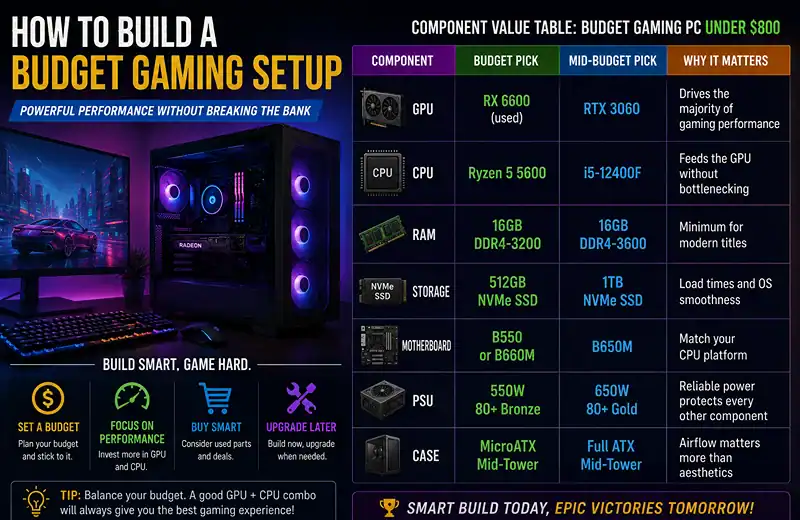
Component Value Table: Budget Gaming PC Under $800
| Component | Budget Pick | Mid-Budget Pick | Why It Matters |
|---|---|---|---|
| GPU | RX 6600 (used) | RTX 3060 | Drives the majority of gaming performance |
| CPU | Ryzen 5 5600 | i5-12400F | Feeds the GPU without bottlenecking |
| RAM | 16GB DDR4-3200 | 16GB DDR4-3600 | Minimum for modern titles |
| Storage | 512GB NVMe SSD | 1TB NVMe SSD | Load times and OS smoothness |
| Motherboard | B550 or B660M | B650M | Match your CPU platform |
| PSU | 550W 80+ Bronze | 650W 80+ Gold | Reliable power protects every other component |
| Case | MicroATX Mid-Tower | Full ATX Mid-Tower | Airflow matters more than aesthetics |
The Used GPU Market Is Where the Real Deals Are
The used GPU market is worth taking seriously. Cards like the RX 6600, RTX 3060 and even the RTX 3070 show up regularly on eBay and Facebook Marketplace well below retail. A used RX 6600 frequently outperforms a new RTX 3050 that costs more, which is the single biggest saving available to a budget builder.
The main risk is mining history. Ask the seller directly. A card that ran in a mining rig around the clock for eighteen months will have oxidised thermal paste and worn fans. It won’t fail immediately, but it will run hotter and it will die sooner.
Budget Peripherals: What Is Worth Buying, and What to Skip
Monitor
A 1080p IPS panel at 144Hz is the standard target for a budget build. IPS gives you better colour and viewing angles than the TN alternatives at similar money. AOC, LG and ViewSonic all offer 24-inch options in this bracket. Avoid 60Hz panels, because the jump to 144Hz is the single most noticeable upgrade you can make for a small price difference.
Keyboard
Entry-level mechanical keyboards have dropped a lot in price. Redragon and Keychron’s lower tiers offer real mechanical switches in the $40 to $60 range. Membrane keyboards around $20 work fine, but a mechanical switch is more forgiving during long sessions.
Mouse
Sensor quality matters more than the DPI number on the box. Any mouse using a PixArt PAW3360 or PAW3395 sensor will track accurately at any sensible DPI setting. Weight matters too, and if you play anything requiring fast flicks, a lightweight mouse under $50 is where the money goes furthest.
Headset
A simple headset with a boom mic beats most branded gaming headsets at the same price. If you want the full breakdown of what’s worth buying at this tier, the best gaming headsets under $50 covers the trade-offs between mic quality, comfort and driver tuning.
Controller
Not every game suits mouse and keyboard. Racing games, platformers and anything you play from the couch are better with a pad, and a decent controller costs less than most peripherals here. The gaming controllers for PC and mobile guide covers which ones are worth it.
Chair
Skip the $150 branded gaming chairs with poor lumbar support. A used office chair from Herman Miller or Steelcase on Facebook Marketplace will outlast and outperform them at a similar price.
Practical Build Tips
| Tip | What to Do | Why It Matters |
|---|---|---|
| Don’t skip the PSU | Use 80+ Bronze or better from Corsair, EVGA or Seasonic | Cheap PSUs fail and can take other components with them |
| 512GB SSD is the real minimum | Avoid 256GB drives | Modern games exceed 60GB each and Windows takes 30 to 40GB alone |
| Run RAM in dual-channel | Buy two 8GB sticks, not one 16GB stick | Dual-channel outperforms single-channel in gaming |
| Use free Windows 11 | Download via Microsoft’s official media creation tool | No paid license needed to get started |
How to Upgrade Your Budget Setup Over Time
A budget build doesn’t have to stay a budget build. Choosing the right platform lets you upgrade in stages instead of replacing everything at once.
Step 1, now: A Ryzen 5 5600 on a B550 board with a used RX 6600.
Step 2, six to twelve months: Add a second RAM stick if you started with one, or move to 32GB if you game while streaming.
Step 3, twelve to twenty four months: Replace the GPU. B550 supports far newer cards than an RX 6600, and your CPU stays where it is.
Step 4, two to three years: A full platform upgrade, once your target games actually demand it.
Done this way, the budget build becomes a floor rather than a ceiling.
FAQ
How much does a complete gaming setup cost?
Expect $700 to $900 in total for a decent 1080p tower, a 144Hz monitor and basic peripherals. You can get closer to $600 by reusing parts you already own, but quality drops quickly below that.
Can you build a solid gaming PC for under $500?
Yes, with used components. A used RX 6600 or RTX 3060 paired with a Ryzen 5 3600 or 5600 can play most modern titles at medium to high settings at 1080p, and the whole tower can land under $500 if you shop the used market carefully.
What is the best GPU for budget 1080p gaming?
The used RX 6600 offers the best value per dollar at 1080p. If you specifically need ray tracing or DLSS, you will have to step up to the RTX 3060 and pay the difference.
Is 16GB of RAM still enough for gaming?
For gaming alone, yes. Demanding titles peak around 12 to 14GB under load. If you stream or keep a lot of browser tabs open while playing, 32GB starts to make sense, but it is not urgent for most people.
Should I buy a prebuilt or build my own?
If you can spare a couple of hours for research and assembly, build your own, because custom builds deliver noticeably better performance per dollar. Prebuilts make sense if your time is worth more than the saving, or you simply don’t want to assemble a machine. HP Victus and Lenovo IdeaCentre are reasonable entry points.
What peripherals do I actually need to start?
Monitor, mouse, keyboard, and a headset or speakers. A webcam and dedicated microphone are optional unless you plan to stream. A gaming chair is the least impactful purchase at the budget end.
Your Next Steps
Once you know which GPU you want, search eBay’s sold listings rather than active ones, because that shows what cards actually sell for instead of what sellers are asking. Cross-check performance tiers against a GPU hierarchy before committing.
Then lock in your CPU platform. The Ryzen 5 5600 on AM4 remains the most common recommendation for cost and upgrade flexibility. The LGA1700 i5-12400F is a viable competitor with slightly better single-core performance.
Once the core components are set, everything else falls into place. The monitor and peripherals can arrive in phases. The tower is the foundation, and it deserves to be right first.
Share this article

Ryan has been playing Roblox since 2017. He started keeping a personal spreadsheet of codes that actually worked after getting burned one too many times by lists that hadn't been updated in weeks. That spreadsheet turned into BossGamerz. He still plays Blox Fruits and King Legacy regularly — not to write about them, but because he genuinely enjoys them. He handles what gets published and what doesn't. If a code list goes up on this site, he's either tested it himself or someone on the team has done it in front of him.
View all articles