
Best Gaming Mouse for Roblox: Top Picks by Play Style
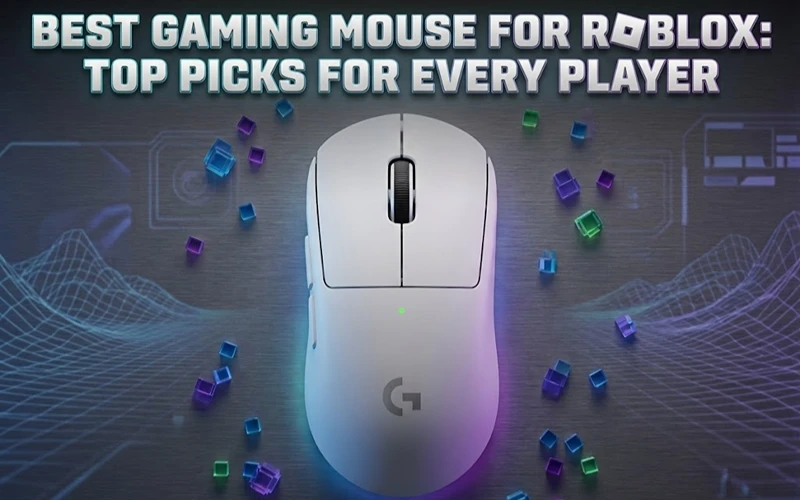
The best gaming mouse for Roblox right now is the Logitech G Pro X Superlight 2 if you play seriously, the Corsair Katar Pro XT if you want to spend less, or the Razer Orochi V2 if you have smaller hands. Brand matters less than fit, though, and what works in Arsenal feels completely wrong in an obby or a simulator.
| Mouse | Weight | Sensor | Best For | Price Range |
|---|---|---|---|---|
| Logitech G Pro X Superlight 2 | 60g | HERO 2 | FPS games, competitive | $150 to $160 |
| Razer DeathAdder V4 Pro | 56g | Focus Pro 45K Gen-2 | All-around performance | $130 to $150 |
| Corsair Katar Pro XT | 73g | PixArt 3327 | Budget casual players | $35 to $45 |
| Razer Orochi V2 | 60g | Focus+ | Small hands, portability | $60 to $70 |
| Redragon M686 Vampire Elite | 119g | PixArt 3335 | Budget wireless | $40 to $55 |
Prices are indicative ranges and move often. Check before buying.
Why Roblox Is More Demanding Than Players Expect
Roblox isn’t one game, it’s thousands of them, and that is exactly why mouse choice is harder here than for a single title.
In fast FPS experiences like Arsenal, Phantom Forces or Bad Business, you want a low lift-off distance, a polling rate of at least 1000Hz, and an optical sensor that tracks without acceleration. In simulators and building games, almost any mouse is fine.
The common mistake is buying for DPI. A 30,000 DPI sensor means nothing if you run sensitivity at maximum and lose all precision. Most experienced Roblox FPS players sit between 800 and 1600 DPI with in-game sensitivity tuned separately.
The Options, Explained
Logitech G Pro X Superlight 2
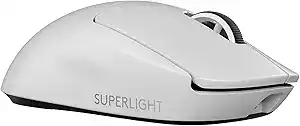
This earns its reputation through consistency. At 60g it is effortless to flick with, and the HERO 2 sensor tracks far beyond anything a human hand produces. Battery life around 95 hours at 1000Hz polling is long enough that charging stops being something you think about. The symmetrical shape suits most grip styles.
The catch is the side buttons sit on the left only, which limits left-handed players, and at $150 and up it is a lot of mouse for casual Roblox sessions.
Razer DeathAdder V4 Pro
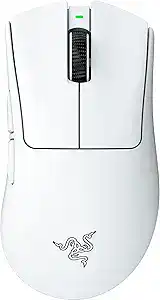
The DeathAdder gives you an ergonomic edge if you use palm or claw grip with a medium to large hand, since the right-handed shape supports the hand rather than asking it to hold a flat slab. The Focus Pro 45K Gen-2 sensor is overkill for Roblox and performs accordingly. HyperSpeed Wireless Gen-2 keeps latency level with wired, and battery life runs up to 150 hours at 1000Hz.
The point most comparisons skip is fatigue. Over two or three hour sessions the ergonomic shape matters more than the spec sheet does.
Corsair Katar Pro XT
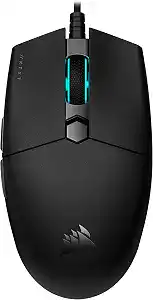
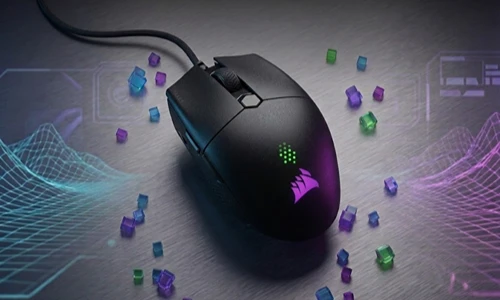
This is the honest budget pick. It isn’t ultralight and the PixArt 3327 isn’t a flagship sensor, but it is accurate enough for anything Roblox asks of it. At $35 to $45 it is the right answer if you aren’t sure you need a gaming mouse at all yet, and the low-profile body suits the small desks most Roblox players actually have.
If you want something lighter in the same price bracket, our roundup of lightweight gaming mice under $50 covers the options that prioritise weight over features.
If you sometimes play on a pad instead, the best gaming controllers for PC and mobile guide covers what pairs well with a budget setup.
Razer Orochi V2
The Orochi deserves more attention than it gets. Its compact body is genuinely better for small and medium hands rather than being a compromise version of something bigger. It runs on two AA batteries, or one if you want to cut weight further, and offers Bluetooth alongside 2.4GHz. For younger players, or anyone gaming on a laptop without much desk space, it is the practical choice.
How to Set Up Your Mouse for Roblox FPS Games
The hardware is half the job. This is what matters after you plug it in. If you are still getting your setup together generally, our guide to playing Roblox on PC covers the rest of it.
Step 1: set DPI to 800 to 1200
Open your mouse software, whether that is G Hub, Synapse or iCUE, and set a single DPI stage in this range. Avoid multiple stages during gameplay, because switching by accident ruins consistency more than any sensor difference ever will.
Step 2: disable mouse acceleration in Windows
Go to Settings, then Bluetooth and Devices, then Mouse, then Additional Mouse Settings. Under Pointer Options, untick Enhance pointer precision.
This is the single most important step on the page. Acceleration makes your cursor travel different distances depending on how fast you move, which makes aim impossible to learn.
Step 3: match in-game sensitivity
Sensitivity sliders differ between Roblox FPS games. Start at 50% in game with your DPI already set, then adjust from there. Don’t raise DPI to compensate for a low in-game slider.
Step 4: set polling rate to 1000Hz
Most gaming mice support it. Higher rates like 4000Hz and 8000Hz exist, but the difference in Roblox specifically is marginal and the battery cost is not, so 1000Hz is the sensible default.
One setup detail worth checking: plug a wireless receiver into a port on the PC itself rather than daisy-chaining through whatever is nearest. If your desk is short on ports, a powered USB hub is a better solution than an unpowered one, which can cause dropouts under load.
The classic failure is setting 3200 DPI because higher sounds better, then maxing in-game sensitivity as well. The result is overshooting every target. Precision comes from low DPI and a large mousepad, not from a big number.
Four Things Worth Knowing Before You Buy
| Point | What It Means in Practice |
|---|---|
| Surface matters as much as sensor | A hard pad suits fast flicks, cloth suits controlled tracking. Budget for a large pad alongside any mouse purchase. |
| Wireless latency is a solved problem | Modern 2.4GHz from Logitech Lightspeed and Razer HyperSpeed is indistinguishable from wired in Roblox. Buy on shape and weight, not on the cable. |
| Weight is preference, not a ranking | Lighter is not automatically better. Some players control a heavier mouse more precisely, particularly with palm grip. Try before assuming. |
| Grip style decides shape | Palm grip suits longer, higher-profile mice like the DeathAdder. Claw grip suits shorter bodies like the Orochi and Katar. Fingertip grip suits flat lightweight designs. |
FAQ
What DPI is best for Roblox?
Most competitive Roblox FPS players run between 800 and 1600 DPI with in-game sensitivity adjusted to suit. Higher DPI does not mean better accuracy, it means faster cursor travel, which usually hurts you in close-range duels.
Do you need a gaming mouse to play Roblox?
No. But a mouse with a good optical sensor and 1000Hz polling gives you a real advantage over an office mouse in FPS and PvP experiences if you play regularly.
What is the best budget gaming mouse for Roblox?
The Corsair Katar Pro XT at $35 to $45 is the strongest pick under $50. If you specifically want wireless on a budget, the Redragon M686 is worth a look, though at 119g it is much heavier than the rest of this list.
Wireless or wired for Roblox?
Wireless, if you are buying from a mainstream brand. Modern 2.4GHz wireless performs the same as wired in Roblox, so the only real consideration left is remembering to charge it.
What mouse do Roblox FPS creators use?
Mostly the Logitech G Pro X Superlight 2 or Razer Viper V3 Pro, though sponsorships play a large part in that. For casual Roblox titles the Katar Pro XT does the same job for a fraction of the price.
What To Do Next
If you play Roblox FPS games more than three times a week, the G Pro X Superlight 2 or DeathAdder V4 Pro are both worth the money, and either way do Step 2 above. That single Windows acceleration fix will do more for your aim than the mouse will.
For casual or occasional play, the Katar Pro XT is genuinely enough, and the money is better spent elsewhere.
Once the mouse is sorted, the next real upgrade is the mousepad. Pairing any of these with a large, consistent surface makes the whole setup feel more precise, and it costs a fraction of what the mouse did.
Share this article

Ryan has been playing Roblox since 2017. He started keeping a personal spreadsheet of codes that actually worked after getting burned one too many times by lists that hadn't been updated in weeks. That spreadsheet turned into BossGamerz. He still plays Blox Fruits and King Legacy regularly — not to write about them, but because he genuinely enjoys them. He handles what gets published and what doesn't. If a code list goes up on this site, he's either tested it himself or someone on the team has done it in front of him.
View all articles