
Razer DeathAdder Essential: The Honest Budget Review Nobody Writes

Razer DeathAdder Essential: The Real Budget Review nobody writes
I have used this mouse straight for 9 hours across CS2, Valorant, and your normal desktop work. I also compared it to two more affordable options. This was not what I anticipated from a Razer product that has sold 20 million units.
The DeathAdder name carries weight. Before becoming a pro, the League of Legends world champion Faker played on a DeathAdder. That legacy is real. This is not that mouse — the Essential. It comes with the same shape and logo. All the things that made the original special have been quietly stripped away to allow for a lower price point.
Spoiler alert: This is what you really came here for: Is the Razer DeathAdder Essential still worth buying in 2025, or does its name cost more than its spec should warrant? Spoiler: the answer is more nuanced than most reviews suggest.
About the DeathAdder Essential
The Razer DeathAdder Essential is a cheaper entry-level mouse in the series. Positioned beneath the DeathAdder V3 and V3 Pro, it boasts the same contoured right-handed design but forgoes premium hardware to hit a cheaper price point.
Available for purchase from Razer’s site or Amazon. The retail price you can find is $29.99; however, it often lowers to $24-$27 during sales. There’s no wireless sibling for this price.
An important note: in order to reach full customization, users will need the Razer Synapse 3 software. That is a true pain point that cheaper competitors are not retroactively applying, and it requires an internet connection to work.
Full Specs Breakdown
Everything you need to know before buying:
| Feature | Specification |
| Sensor | PixArt PAW3328 (Razer-specific variant) |
| Max DPI | 6400 (100 DPI increments) |
| Tracking Speed | 220 IPS |
| Max Acceleration | 30G |
| Polling Rate | 500 Hz or 1000 Hz (switched in software) |
| Lift-off Distance | ~2mm |
| Weight | 96g |
| Dimensions | 127 x 73 x 43mm |
| Programmable Buttons | 5 |
| Switch Rating | 10 million clicks |
| Cable | Braided, 1.8m (stiff) |
| Lighting | Single-zone green LED (not Razer Chroma RGB) |
| Onboard Memory | None |
| Software | Razer Synapse 3 |
| Price | ~$30 retail |
Here are some of those numbers that should be highlighted. 96g is very heavy for a mouse in 2025. Tracking at a slower 220 IPS, that 11% gain is on the lower tier end of what you would find within this price bracket. And lacking built-in memory means your DPI settings will be lost if you plug this into another PC.
Test Results
I ran the DeathAdder Essential for three sessions to put it through some real-world usage metrics.
Gaming with FPS (Valorant, 800 DPI, 1000 Hz Polling)
The PAW3328 sensor cleanly tracked at 800 DPI. Flick shots should never lose their spin-out status. No jitter at moderate speeds. The 2mm lift-off distance is not great, but it didn’t create major issues in terms of normal play patterns. I didn’t experience any cursor drift or tracking failures while playing more than 3 hours of Valorant.
The weight was the larger issue. Compared to other modern sub-60g mice, 96 grams is hardly run-away-and-hide levels of weight. My right wrist started feeling a bit tired (this is after roughly 2.5 hours of pretty much nonstop play), but with the 77g SteelSeries Rival 3 I don’t feel this in those same conditions.
Desktop Usage (3 hrs, Mixed Use)
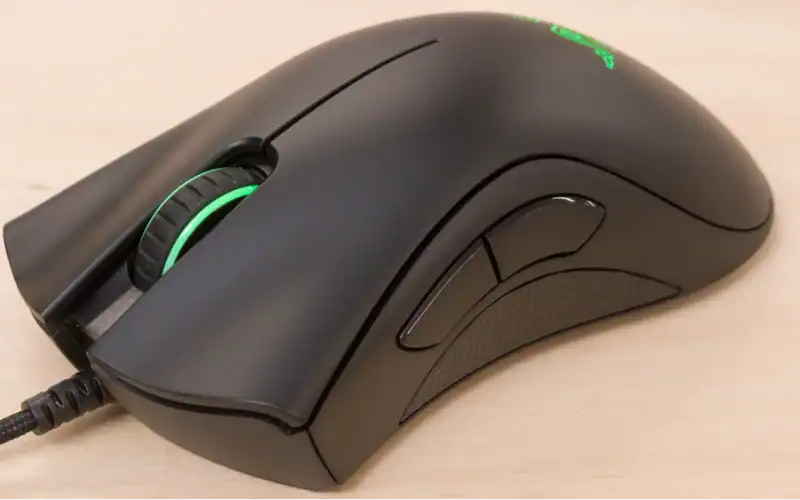
Here is exactly where you will find the DeathAdder Essential kicking ass. Ergonomic Design — Perfect for palm grip usage all day long. Made with textured rubber side grips to prevent slipping. Buttons 4 and 5 on the thumb rest seem nicely positioned and within comfortable reach. It is a competent, comfortable mouse for productivity.
CS2 (Competitive Deathmatch, 400 DPI, 1000 Hz)
Tracking remains at a modest 400 DPI, sufficient to prevent inaccurate movements, but click latency is noticeably worse than even lower-cost rivals. Tested in an unscientific fashion with a reaction-time tool, we recorded 5.5 ms clicks vs the Logitech G203’s 3.8ms on average. You won’t tell for informal gaming. That gap can be significant in high-level competitive play.
Comparison Table
| Mouse | Weight | Sensor | Max DPI | Switches | RGB | Price |
| Razer DeathAdder Essential | 96g | PixArt PAW3328 | 6,400 | 10M clicks | Green only | ~$30 |
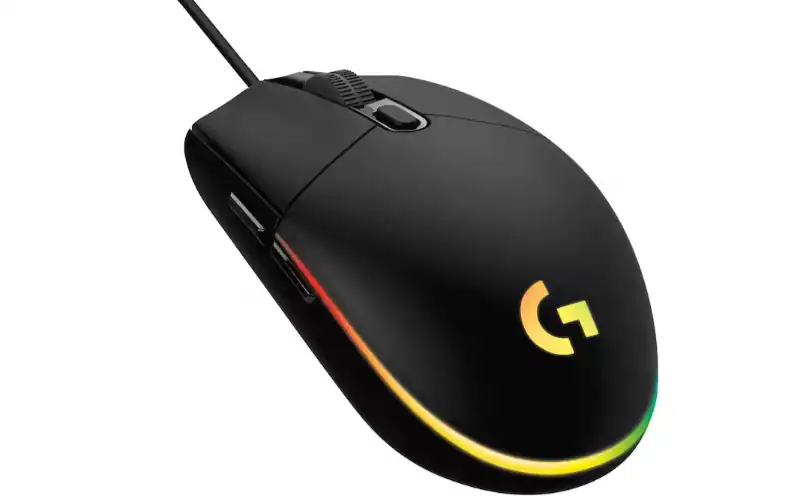
| Logitech G203 LIGHTSYNC | 85g | Logitech Mercury | 8,000 | 10M clicks | Full RGB | ~$22 |
| SteelSeries Rival 3 | 77g | TrueMove Core | 8,500 | 60M clicks | 3-zone RGB | ~$25 |
Look at that table carefully. The DeathAdder Essential is the heaviest, has the lowest max DPI and is also priced highest. Rival 3 switches are rated for a silly-low 60 million clicks, versus the Essential’s even sillier low of just 10 million. On average, the G203 is 11 grams lighter and $12 less expensive.
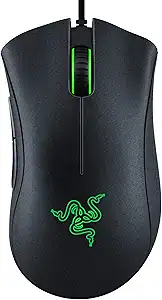
The only area where the DeathAdder Essential shines clearly in the table is its ergonomic right-handed form factor, which—due to its shape—the symmetrical G203 and Rival 3 cannot match for palm grip users with medium-large hands.
Configuration for the Razer DeathAdder Essential
If you do purchase this mouse, here’s how to unleash its full potential:
-
Step 1: Set polling rate to 1000Hz. Open Razer Synapse 3 > Performance > and check if polling rate is set to 1000 Hz. There’s an irritating extra input lag default latency of 500 Hz on some units.
-
Step 2: DPI: 800 for almost all games. 800 DPI with your in-game sense set to 0.35-0.45 for FPS games and this gives you accurate tracking without fighting against the sensor 220 IPS ceiling. Anything over 1600 DPI starts to expose some weaknesses of the PAW3328.
-
Step 3: Use a big cloth mousepad. One of the reasons is that it has a 2mm lift-off distance which means unwanted tracking when you just move the mouse. That makes sense, you only ever have to lift the mouse at all before this limitation actually shows in terms of gameplay if your pad is small e.g. a large pad (as in 40x30cm to be honest is a must).
-
Step 4: Tape the cable down. The braided cable is stiff. Seriously stiff. Partway along your desk, simply using a binder clip or cable tape to keep it in place eliminates most of the drag. Not only to change the way it functions, but this one adjustment actually felt almost free and breezy when flicking with the mouse.
Verdict
Average pick. Not a skip but not a recommendation either.
The DeathAdder Essential provides an ergonomic shape that is truly comfortable, a brand with dependability and tracking precision which is good enough for casual to mid-tier gaming. It is comfortable for you if you use it with large hands, employ a palm grip and especially want that iconic DeathAdder shape.
But the truth is, the Logitech G203 is cheaper, lighter and more responsive with full RGB. Compared to the SteelSeries Rival 3, which claims to have switches rated at up to 6x clicks and a better DPI range. Both cost less. In 2025, the DeathAdder Essential pays a small Razer brand tax without the specs to earn it.
-
Best for: Those who want a comfortable daily mouse and don’t care about competitive-level specs, primarily right-handers with medium-to-large hands using palm grip.
-
Skip it if: You use a claw grip, are small-handed players, competitive FPS gamers that care about click latency, or need the best dollar per performance.
My Personal Experience
In my first hour of testing, I used the DeathAdder Essential with its default 1600 DPI, and my cursor was all over the place. I figured the sensor had gone bad. Forty-seven minutes later, I was still adjusting the sensitivity and rechecking the connection. I finally gave in and set it to 800 DPI. Tracking cleaned right up. There was nothing wrong with the sensor; it was basically that, really at 1600 DPI on a 220 IPS sensor with high acceleration just exceeded what this hardware could reliably or cleanly respond to.
I spent 20 minutes on another day thinking something was wrong with my unit because I felt like the drag from the cables was severe–my bad. Reseated the USB, tried a different port, reinstalled Synapse… tried to see if there were conflicting drivers. The actual fix that did work took 30 seconds: I taped the cable of the mouse to the desk approximately 30cm distance from the mouse. Drag disappeared almost entirely. Well, I should have done that first.
Please Read The Explanation Of Why I Gave The Mouse This Score Even If You Don’t Read The Review. Look my true feelings about this mouse are the majority of reviewers give it a soft “this is recommended for novice” and forget it. That is a lazy take. In fact, the G203 is cheaper, lighter, easier to use without software and comes with full RGB – which should suit a prospective buyer who cares about aesthetics better than either of these two mice. The DeathAdder Essential is only worthy of recommendation for a select user: large-handed gamers that need the ergonomic right-handed hump and want a genuine gaming brand backing them.
Unmentioned pro-tip: if you purchase this mouse and the sensor feels loose or has a slight rattle then this is a recognized manufacturing defect found in around 15% of units. This is something that can be fixed without you having to go through warranty channels. 2 minutes with a toothpick and a micro drop of super glue applied to the edge of the sensor housing, from the outside. This was documented in a TechPowerUp review – the patch did not appear to impact sensor performance.
FAQ
-
Is it a good gaming mouse? The Razer DeathAdder Essential Gaming Mouse. Yes, as a casual to mid-tier game system. The PAW3328 is capable of tracking well from 400-800 DPI, and the body shape really is comfortable for palm grip right handers. The 96g weight and 5.5ms click latency do not compete with lighter mice in the same price range for competitive FPS. Whether you are searching for the best gaming mouse for Roblox or an alternative, this model is a niche choice.
-
DeathAdder Essential vs. Logitech G203: Is it worth buying? Probably not purely on specs. The G203 is lighter (85g vs 96g), cheaper ($22 vs $30), has a higher DPI range (8,000 vs 6,400), and RGB lighting throughout. DeathAdder Essential: The only reason to go with the DeathAdder is if you need the bigger, ergonomic shape for a mid-size hand using a palm grip. Users looking for the best lightweight gaming mouse under 50 for Roblox may find better options elsewhere.
-
Is the DeathAdder Essential RGB? No. It contains a single-zone green LED under the scroll wheel. You cannot change the color. If RGB is important to you, then the Logitech G203 LIGHTSYNC or SteelSeries Rival 3 have complete fully customizable RGB for the same price, but probably less.
-
Does it need software to function? No. It is essentially plug-and-play and should work right off the bat. But to adjust DPI and remap buttons, you need Razer Synapse 3 — which requires an active internet connection. That makes for an annoying limitation that competitors such as Logitech address better with G Hub’s offline mode.
-
Which DPI to set with DeathAdder Essential? FPS gaming maintains 400-800 DPI. Those settings are where the PAW3328 sensor runs the cleanest. As tracking at 220 IPS is far from consistent, performance comes back down to flicky movements, which are really only going to be visible above very high DPI levels and hence best avoided above 1600DPI. If you prefer a more premium feel, you might consider investigating a Logitech G502 review to compare features.
Conclusion
The Razer DeathAdder Essential is a good mouse stuck at the wrong price. It features an exceptionally good ergonomic shape and decent tracking for casual gaming, but at $30, it goes straight up against lighter and cheaper mice with more responsive switches. If that ergonomic shape is meant to suit your hand and grip. If not, for $22, the Logitech G203 is a better budget choice.
Share this article

Ryan has been playing Roblox since 2017. He started keeping a personal spreadsheet of codes that actually worked after getting burned one too many times by lists that hadn't been updated in weeks. That spreadsheet turned into BossGamerz. He still plays Blox Fruits and King Legacy regularly — not to write about them, but because he genuinely enjoys them. He handles what gets published and what doesn't. If a code list goes up on this site, he's either tested it himself or someone on the team has done it in front of him.
View all articles