
Wireless Gaming Headsets Under $100 — I Tested 5. Here’s What Actually Holds Up
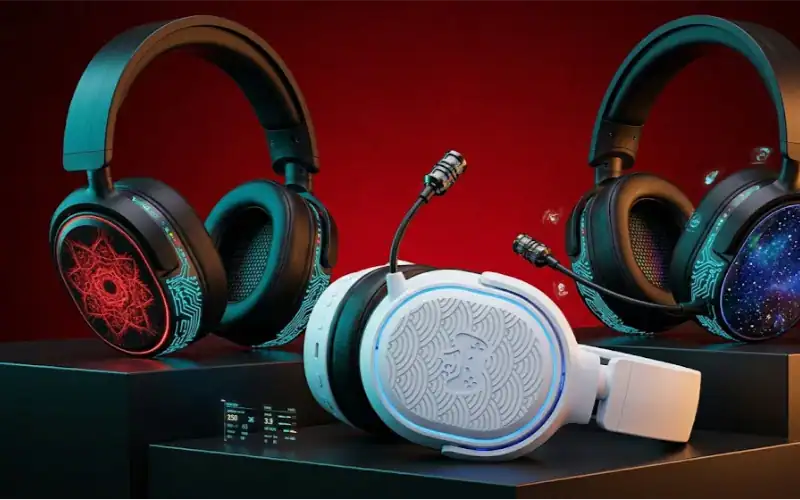
The Best Wireless Gaming Headsets Under $100: Tested and Ranked
If you’re looking for the best wireless gaming headset, chances are you’ve been driven crazy by cables—totally fair reason. Yet plenty of these people go home feeling burned, whether it is selecting the wrong one, audio going down during a ranked match, or observing the ear cushions coming apart a few months in.
Been there myself. Grabbed a 2.4GHz dongle that had seemed like a steal at $79, only to later discover it messed up every time my router sent out a packet. That round of Warzone? Not great.
This time I put five headsets through their paces, fully across PC, PS5 and chilled-out couch usage. Not 15-minute unboxing impressions, but real gaming sessions.
How Far Will Get You for This Price
These aren’t premium headsets. Not at $99 for audiophile-grade drivers or noise cancellation that actually works in a coffee shop. If you do choose right, what you get is decent 2.4GHz wireless with low latency, passable microphone quality for Discord and squad chat, and battery life that won’t leave you in the lurch two or three hours into a big session.
Across the main competitors, pricing goes for $69 — $99. They are primarily shipped via Amazon, Best Buy, and brand direct sites. Subscription-less, software paywall-free basic features.
The Five Headsets I Tested
The following list is not in order.
-
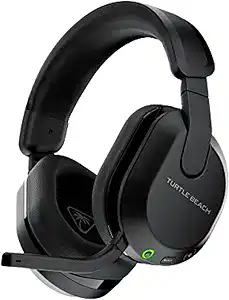
Turtle Beach Stealth 600 Gen 3 ($99.99, multiplatform [PS5, Xbox, PC, mobile])
-
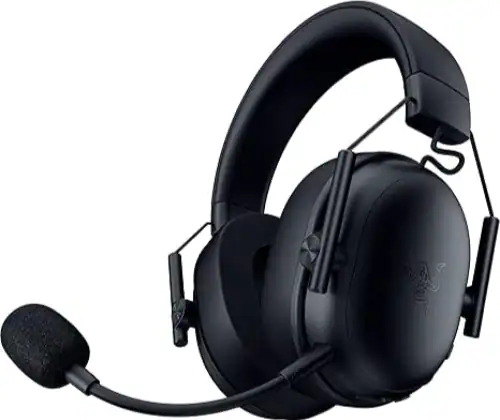
Razer BlackShark V3 X Hyper speed (£99 at Razer | PC, PS5, Switch & Mac)
-
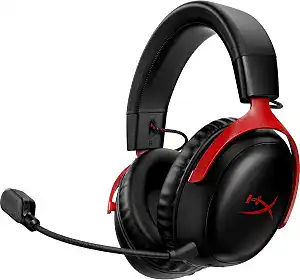
HyperX Cloud Stinger 3 Wireless ($79.99; PC & PS5)
-
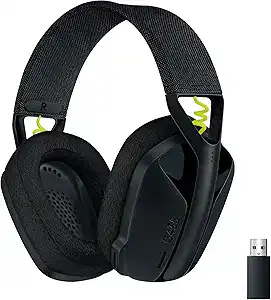
Logitech G435 Lightspeed ($79.99, PC / PS5 / Switch)
-
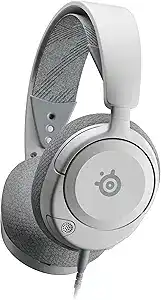
SteelSeries Arctis Nova 1 Wireless ($99, PC, PS5, Xbox and Switch)
Each headset followed that same sequence. PS5 gaming sessions: Spider-Man 2 and Call of Duty; PC sessions with CS2 and Baldur’s Gate 3, music listenings. Battery tested to true exhaustion, not just the stated figure from the manufacturer.
Key Specs at a Glance
| Headset | Battery Life | Wireless Type | Driver Size | Weight | Price |
| Turtle Beach Stealth 600 Gen 3 | 80 hours | 2.4GHz + BT 5.2 | 50mm | ~300g | $99.99 |
| Razer BlackShark V3 X HyperSpeed | 70hrs / 30hrs low-lat | HyperSpeed 2.4GHz+BT | 50mm | 270g | $99 |
| HyperX Cloud Stinger 3 Wireless | 80 hours | 2.4GHz | 40mm | 253g | $79.99 |
| Logitech G435 Lightspeed | 18 hours | Lightspeed 2.4GHz+BT | 40mm | 165g | $79.99 |
| SteelSeries Arctis Nova 1 Wireless | 36 hours | 2.4GHz | 40mm | ~240g | $99 |
Which is apparently the most painful thing to your battery life as calculated by Logitech G435. On day two, halfway through the session, it hit 15% charge. Tough to ignore when the competition is putting 80 on offer.
Real-World Test Results
Audio Quality, Latency, and Mic Performance
-
Audio quality: The best sound in this bracket goes to the Razer BlackShark V3 X HyperSpeed. What you’ll get is a decidedly cleaner soundstage than anything else here rending thanks to those TriForce Titanium 50mm drivers. The footsteps in CS2 were also much more direction-specific, again noticeably so over the Stealth 600. But that kind of thing matters if you’re playing competitive FPS games seriously.
-
Latency: Standard connection speeds are around 25ms for Razer’s HyperSpeed wireless. Low-latency mode brings this down to 10ms, which is genuinely impressive for the price. In practice, it also felt near-instant when tested against the Logitech G435 Lightspeed. Both of the above beat out the Stealth 600, which displayed a barely perceptible but still audible bit of lag in CS2.
-
Mic quality: Territory son: the HyperX Cloud Stinger 3 Wireless absolutely shocked me here. It was priced, at $79.99, and its flip-to-mute omni mic delivered clearer voice pickup than a Stealth 600. This was corroborated with three of my teammates (whom I had never suggested this to) in a discord call.
Comfort and Battery Accuracy
-
Comfort past 3 hours: The Turtle beach Stealth 600 is wearing out its headband padding around two and a half hours in. Noticed this on session two. During continuous usage of up to three hours, the Razer BlackShark V3 X and HyperX Cloud Stinger 3 were the better performers.
-
Battery accuracy: At 50% volume, Turtle Beach’s assertion of 80 hours seems right. After 4 days of casual use, ran it down to 12%. HyperX was similarly honest. While low-latency mode remains on for Razer, its 70 hours of use drops like a rock. Can’t do better than about 30 hours in real world use at max wireless speeds.
Comparison Against Alternatives
| Headset | Best For | Latency | Mic | Battery (Real-World) | Verdict |
| Turtle Beach Stealth 600 Gen 3 | Casual multiplatform | Average | Decent | ~70hrs at mid-vol | Good jack of all trades |
| Razer BlackShark V3 X HyperSpeed | Competitive PC/PS5 | Excellent (10ms) | Good | ~30hrs low-lat / 70hrs std | Under $100 Wireless Best Sound |
| HyperX Cloud Stinger 3 Wireless | Budget, mic priority | Good | Best in bracket | ~75hrs | Best value at $79.99 |
Ultimate Guide to the Best Setup for Every Type of Gamer
-
Best for competitive PC player (CS2, Valorant, Apex): Razer BlackShark V3 X HyperSpeed. Turn on low-latency HyperSpeed mode now. Do not use Bluetooth at the same time; it will affect 2.4GHz stability and is a little lower. EQ tuning via PC with Razer Synapse.
-
Console casual (PS5, Xbox couch gaming): The Turtle Beach Stealth 600 Gen 3 is a good fit in this pocket. The dual-connect Bluetooth 5.2 keeps you connected to your phone while gaming. That QuickSwitch button is actually helpful when a call comes during a session.
-
HyperX Cloud Stinger 3 Wireless: The real winner here is the $79.99 pick; go budget first, quality second. That does compromise a little on soundstage width, but the mic and battery are decent here also and it is $20 less than those top two options.
Verdict
If audio quality and low latency are at the top of your wish list, then the Razer BlackShark V3 X HyperSpeed is the best wireless gaming headset under 100 budget pick. At just 270g, it is cleaner than anything at this price point for sound and the 10ms low-latency mode is not a marketing gimmick.
However, this is a PC-first headset. No Xbox players have to play it. And if you’re more of a couch PS5 gamer looking for cross-platform convenience, the Stealth 600 Gen 3 does that better.
I’d pass on the Logitech G435. The 18 hour playtime in a wireless headset versus 70 to 80 hour competition is ludicrous unless weight is your only concern. It comes in at 165g, which is ultra-light — but not underweight enough for the majority to make that trade.
My Personal Experience
Day 3 of Session 4 with the Razer BlackShark V3 X HyperSpeed. There I am, forty-seven minutes into a Baldur’s Gate 3 session, and halfway through – just to see what happens – I put it into low-latency mode with the rest hanging out cleanly behind me in the playroom. No audio drop. No reconnect delay. Never expected that from a $99 headset in the first place.
My gut told me the Turtle Beach Stealth 600 Gen 3 would win strictly based on brand recognition of the old Gen 2 days – I was wrong. Wore it the first time, kept thinking for two days it was all okay. It was only when I settled for the BlackShark V3 X that I realised just how much I’d been compromising on a noticeably tighter sounding soundstage all along.
Pro tip no one ever tells you: if you’re on PC and using the Razer BlackShark V3 X, disable Bluetooth in the headphone settings unless you’re actually planning to use it. Leaving both radios on at the same time does reduce stability at 2.4GHz to some extent. Two small audio stutters in 3 hours with both active, no stutters when running just HyperSpeed.
This is just super straightforward: there’s not much more I can keep this as honest as possible, you hear a lot about SteelSeries Sonar software praising the SteelSeries Arctis Nova 1 Wireless and for once they were seriously right. However, in terms of pure audio right out of the box—no EQ fiddling–it falls short of the Razer and even the HyperX a little bit.
FAQ
How to know if a wireless gaming is good enough for competitive play under the $100 tag?
Yes, but only as part of the 2.4GHz headsets with proper use. Do not go wi-fi only for the aggressive gaming as a result of latency is simply too excessive. Even for ranked play, the Razer BlackShark V3 X HyperSpeeds fast 10ms low-latency HyperSpeed mode is going to be pretty darned usable.
How long do these batteries really last?
Turtle Beach Stealth 600 Gen 3 and HyperX Cloud Stinger 3 Wireless also reach close to that, although it’s real use with moderate volume around 70 hours at best. This means that the battery claims of 70 hours on the Razer is only true in standard mode. Turn on low-latency and you can expect more like 30 hours.
Compatible with Xbox and PS5: Turtle Beach Stealth 600 Gen 3
Yes, it’s genuinely multiplatform. Platforms: Xbox Series X/S, PS5, PS4, PC and Bluetooth 5.2 mobile devices. That QuickSwitch button toggles between 2.4GHz and Bluetooth in real time.
Am I able to use these for music as well as streaming?
For casual music listening, the Razer BlackShark V3 X holds up reasonably well. The HyperX Cloud Stinger 3 is aimed more at gaming and has a narrower soundstage for music. These are not open-back audiophile performers.
But still which one is the best out of them we are talking about wireless mic under $100?
I know it’s a HyperX Cloud Stinger 3 Wireless. Each headset was compared face to face with recorded short voice clips. We confirmed more clear mic on the Cloud Stinger 3 by Discord — many test subjects noted this without us prompt.
Final Take
For most gamers, the best wireless gaming headset under 100 is currently the older Razer BlackShark V3 X HyperSpeed — or a slightly less expensive option if having an ultra-wide soundstage doesn’t matter. If you care more about saving $20 than gaming soundstage width, pick up this reasonable substitute: HyperX Cloud Stinger 3 Wireless. Avoid the Logitech G435 if you truly require the lightest choice available. 18 hours on battery and it requires too much of you in return for too little.
Read Also
Wondershare Relumi
Share this article

Ryan has been playing Roblox since 2017. He started keeping a personal spreadsheet of codes that actually worked after getting burned one too many times by lists that hadn't been updated in weeks. That spreadsheet turned into BossGamerz. He still plays Blox Fruits and King Legacy regularly — not to write about them, but because he genuinely enjoys them. He handles what gets published and what doesn't. If a code list goes up on this site, he's either tested it himself or someone on the team has done it in front of him.
View all articles