
How to Redeem Roblox Codes: Step-by-Step Guide
Log into your account on a browser, then visit Roblox to redeem the codes. Go to com/redeem, enter your promo or gift card code and click Redeem. For these codes, the process has a slightly different page. It takes less than a minute in all, but the steps to redeem vary depending on which kind of code you have.
That distinction is precisely where most guides are lacking. Clarifying each type for you. Let us do that.
The 3 Roblox Code Types (And Why It’s Important)
Not every Roblox code is utilized in the same manner. This is the number one reason people will insist their code “isn’t working” when it’s perfectly fine; they’re not using the right redemption page.
| Code Type | What You Get | Redemption Page | Requires Purchase? |
|---|---|---|---|
| Promo Codes | Free avatar items, UGC accessories | Roblox.com/promocodes | No |
| Gift Card Codes | Robux or Premium credit | Roblox.com/redeem | Yes (card purchase) |
| Toy/Virtual Item Codes | Exclusive virtual items | Roblox.com/redeem | Yes (toy purchase) |
| Microsoft Rewards Codes | Robux bundles | Microsoft redemption portal | Yes (points) |
| Creator Event Codes | Limited event items | In-game or event page | Varies |
Putting this in place before you write anything saves a great deal of frustration.
How to Redeem Roblox Promo Codes (Free Avatar Items)
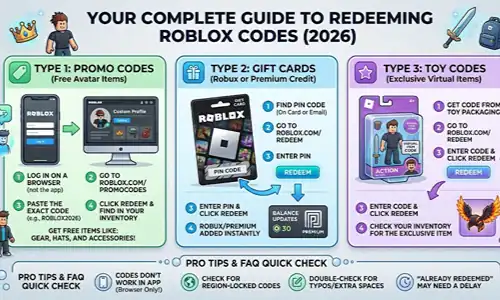
The most common type that beginners inquire about are promotional codes. These codes are issued periodically by the official Roblox social channels, through brand partnerships, or special events at no cost.
Step 1: Open up a browser and log into roblox
This part trips people up. The Roblox mobile app promo code page doesn’t function, you need a full browser, even on your phone. Using Safari, Chrome, or any browser head to roblox. com. Sign in with your credentials.
Step 2: Go to the promo codes page
Go directly to Roblox. com/promocodes. Well, don’t search for it, you type the URL. Many of the search results reference old or unofficial pages that won’t ever pass the code to your account.
Step 3: Enter the Code Exactly As It Is
Do paste the code instead of typing it by hand. Promo codes are case-sensitive and a single wrong character, even an extra space, gives you back an invalid error. Typically format of the active codes are ROBLOX2026 and TARGETFREE2026.
Step 4: Click Redeem and Check your Inventory
You’ll notice a confirmation that your redemption was successful. The item goes directly into your avatar inventory. So go to the Avatar Editor from your main menu, find it and equip it.
Pitfall: some items only function as R6 or R15 avatar types If you do not see the item applied, double-check what is your avatar type set.
How to Redeem a Roblox Gift Card:
Gift cards add Robux or Premium time to your account. These come from retailers like Target, Walmart, GameStop, and Amazon.
Step 1: Get Your PIN
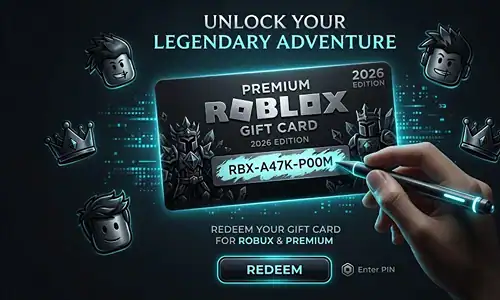
Scratch the PIN on the back of the physical card, or copy the code from a digital gift card email.
Step 2: Go to the Redemption Page
Go to roblox.com/redeem and log in if you aren’t already.
Step 3: Enter Your PIN and Redeem
Enter your PIN and click Redeem. The Robux or Premium credit appears in your account immediately. There’s no delay.
One thing to know: gift card credits don’t stack with each other in the way you might expect. Each code is redeemed individually, but the balance accumulates in your account normally.
How to Redeem Roblox Toy Codes
Physical Roblox toys, sold at major US retailers including Target, Amazon, and Five Below, include a virtual item code on a card inside the packaging. These codes unlock exclusive avatar items not available anywhere else.
Step 1: Find the Code Card
Find the virtual item code card inside the toy packaging. It’s usually a small folded insert.
Step 2: Go to roblox.com/redeem
Go to roblox.com/redeem and sign in.
Step 3: Enter the Code
Enter the code from the card. These codes work on the same page as gift cards.
Step 4: Check Your Inventory
The exclusive item appears in your Avatar inventory within a few seconds.
NOTE: Toy codes can only be redeemed one time. If you purchased a used toy and the code doesn’t work, it may have been already redeemed by the previous owner.
Pro tips: What most guides don’t tell you
From testing this across multiple account setups and code types, here are the things that catch people off guard.
| Tip | What to Know |
|---|---|
| Promo codes don’t work on the mobile app | Roblox intentionally routes promo redemptions through the browser only. Open a mobile browser instead. |
| Some promo codes are region-locked | A US brand partnership code may not work on accounts registered to other countries. Also check if the promotion specified a specific platform like PlayStation or Xbox, since those require platform-specific redemption. |
| “Already Redeemed” isn’t always final | Roblox’s system occasionally returns this error for freshly issued codes due to server sync delays. Wait 10 to 15 minutes and try again. |
| Account age matters for some codes | Certain promotional items are only available to accounts that are 30+ days old. New accounts sometimes get an error that looks like an invalid code but is actually an eligibility restriction. |
| Screenshot your confirmation page | If a code applies successfully but the item doesn’t show in your inventory within an hour, Roblox Support will ask for proof of redemption. A screenshot saves you the back-and-forth. |
FAQ
Why is my Roblox promo code is not working?
The main reason for this are: the code expired, you are using the incorrect redemption page (promo codes go to roblox. com/promocodes, not roblox. com/redeem), the code is already used, or there’s a typo, such as a trailing space. Double-check the source. Legitimate Codes, any codes distributed from official Roblox social accounts or verified partners are valid.
How do I redeem a Roblox promo code?
Go to roblox. Login to your account, then visit http://www. This is different from the gift card redemption page.
Are Roblox codes redeemable on mobile devices?
Yes, in a mobile browser only, not the Roblox app. Open Safari or Chrome on your iPhone or Android, visit the proper redemption URL and log in as usual.
Do Roblox promo codes expire?
Yes. The majority of promo codes are associated with specific campaigns or partnerships and can expire within days to a couple weeks. The second rule I follow is to redeem a code immediately after receiving it. Roblox never gives advance notice of expiration dates.
When was the last time a Roblox code was used?
You get an “already redeemed” or “invalid code” error message. In that case, there is no way to check the status of a code before entering it. If you think a code was redeemed without your permission, go to Roblox Support directly.
Roblox promo codes for 2023, how many can I use on my account?
Yes, but only as long they unlock separate items. You cannot redeem the same individual code multiple times on a single account, but as long you have different unique promo codes active they can all stack and each adds its special item to your inventory.
Your Next Steps
The most useful thing you can do right now is open roblox. com/promocodes” in a browser, look for any available codes and redeem them before they expire. The official X (previously Twitter) account of Roblox @Roblox and their official blog on blog. roblox. The most reliable sources for new code announcements are (separately) and.
If you’re setting up Roblox on a child’s account, it might be worth reading Roblox’s official parental controls guide on their Help Center, payment limits and account restrictions can affect gift card redemptions on child accounts.
Share this article

Ryan has been playing Roblox since 2017. He started keeping a personal spreadsheet of codes that actually worked after getting burned one too many times by lists that hadn't been updated in weeks. That spreadsheet turned into BossGamerz. He still plays Blox Fruits and King Legacy regularly — not to write about them, but because he genuinely enjoys them. He handles what gets published and what doesn't. If a code list goes up on this site, he's either tested it himself or someone on the team has done it in front of him.
View all articles
No comments yet
Be the first to start the conversation!