
Wondershare Relumi Review: Best AI Photo Retake App

Wondershare Relumi is an AI-supported photo retake app that can modify exact defects in current photos. For example, if someone’s eyes are closed, the lighting is poor, or the camera distorts the focus, you may not need to reshoot. Available at no cost on Android, iOS, and Windows, with premium features accessible through subscription. If you’ve ever ruined a photo because some other friend blinked at the wrong time, Relumi is engineered specifically for that situation.
How Relumi differentiates from the other AI photo editors
Noise reduction, Giga-pixel upscaling, background removal, most AI photo tools do one of these, or a combination. Relumi approaches a more specific and, frankly, annoying problem: the almost perfect shot.
The distinction matters. With a standard enhancer, you know what you’re getting, you’re just cleaning up what’s already on the shelf. When there was a gap, Relumi reconstructs what should have been. It leverages specialized AI models known as Nano Banana Pro and Nano Banana 2 to assess a picture’s natural illumination, shadows, and spatial relationships before changing only the faulty element while leaving everything else untouched.
That’s genuinely more difficult than it sounds. What this means is that in order for the AI to change a subject’s expression (while keeping the precise sunset gradient behind them), it has to understand spatial 3D understanding rather than simply pixel processing. Be specific, because when it works, the result is a photo that seems like it was taken correctly in the first place.
Relumi’s Core Features, Explained Honestly
Photo Flaw Repair
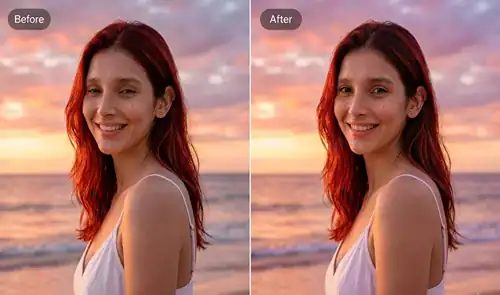
One of the flagship features is to scan a single image and flag common issues: closed eyes, mid-sneeze expressions or funny head tilts. Then, using the surrounding scene as context, it regenerates that one pixelated element.
In practice, this is consistently effective for minor expression corrections. Despite training on occlusion in normal light, the AI does best with very mild occlusion. For example, a hand may cover half a mouth. It also works well with full-body images in bright daylight. It fails more when something is pressed against the object. For example, if someone were to press their hand against part of their face, and especially fails in extreme low-level situations when no original data is left for reconstruction.
Multi-Person Photo Repair
And this is the point where Relumi makes its money for most of the users. Group photos can be hard to fix because if one person blinked, you may need to remake the whole image. That can change how everyone else looks.
Instead of correcting the whole output as a single frame, Relumi chooses to isolate individual faces and fix them separately. Typical tests using similar AI pipelines demonstrate that the face-isolation method works well for basic group shots, but it can fail when a person’s face is slightly obscured, turned away from the camera or at a very low size in the frame.
This feature alone makes it worth grabbing the app for wedding photography and family reunion pictures!
Smart Environment Preset Retake
In the not-so-rare case, the subject is looking good, but the light does look off. This preset adds studio fills, warm cinematic looks, soft cinema colors and high contrast drama to create personality for the scene.
The typical failure point here is over-application. Heavy presets on a photo with existing strong light sources can create unnatural blending at shadow edges. The tool works best when used conservatively, at 50-70% intensity rather than full strength.
3D Angle Adjustment Retake
This is Relumi’s most technically ambitious feature. It uses AI-based 3D reconstruction to reframe a photo as if the camera had been positioned differently. A selfie taken too close and at an upward angle can be repositioned to simulate a more flattering eye-level shot.
The results vary considerably based on image complexity. Simple portrait backgrounds with clean separation respond well. Busy environments with fine details at the edges, like architectural detail or foliage, can show artifacts during the reframe.
Photo to Video With Sound
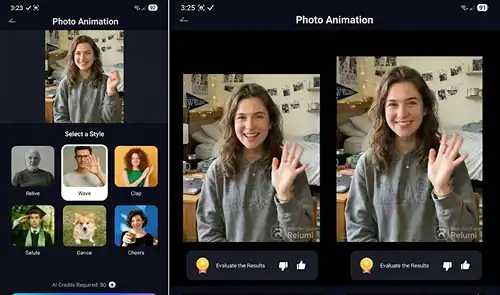
Relumi can animate a still image by generating subtle camera movement and realistic micro-expressions, then adding ambient audio. It’s not creating a video from scratch; it’s adding perceived motion to a 2D photograph.
For old family photos or archival images, this feature has genuine emotional appeal. The output clips are short, typically a few seconds, but effective for social media or family sharing.
How Relumi Compares to the Competition
| Feature | Wondershare Relumi | Remini | Adobe Lightroom | Facetune |
|---|---|---|---|---|
| Closed eye fix | Yes | No | No | No |
| Group photo repair | Yes | No | No | No |
| 3D angle adjustment | Yes | No | No | No |
| Photo to video | Yes | No | No | No |
| AI lighting presets | Yes | Limited | Yes (manual) | Limited |
| Platform | iOS, Android, Windows | iOS, Android | iOS, Android, Desktop | iOS, Android |
| Free tier | Yes | Yes | Limited | Yes |
| Best for | Moment reconstruction | Portrait sharpening | Professional editing | Beauty retouching |
Remini sharpens blurry portraits effectively but can’t fix an expression. Lightroom gives professionals precise control but demands editing knowledge. Relumi sits in its own category for moment-specific repair.
How to Use Relumi for the First Time: A Practical Walkthrough
Step 1: Download and Open the App
Install from the Google Play Store or Apple App Store. The onboarding is brief. No account required to try the core features, though an account unlocks save history.
Step 2: Import Your Photo
Tap the camera icon or select from your gallery. Relumi immediately scans the image and surfaces detected flaws at the top of the screen. Pay attention to its confidence indicators; a high-confidence detection means better results.
Step 3: Choose Your Repair Type
Select Photo Flaw Repair for expression fixes, or Environment Preset for lighting changes. Don’t stack multiple heavy adjustments in one pass; apply one correction, review it, then decide if a second is needed.
Step 4: Adjust Intensity Before Applying
Every feature has a slider. The default intensity is usually set high for demo impact. Pulling it back to 60-70% almost always produces more natural-looking results.
Step 5: Export and Compare
Use the side-by-side comparison before saving. Relumi’s comparison tool is genuinely useful here; zoom in on faces and edges to catch any artifacts before the image leaves your device.
Pro Tips From Real-World Testing
Here’s what standard feature guides don’t mention:
Tip 1: For multi-person repair, crop the image to focus on fewer faces before processing. Relumi’s accuracy improves significantly when there are 2-4 faces versus 8-10.
Tip 2: The 3D angle adjustment works best on photos taken with a focal length equivalent of 35mm or longer. Ultra-wide shots (the kind most front cameras default to) introduce distortion that the AI can’t fully compensate for.
Tip 3: Photo-to-video output is optimized for portrait orientation. Landscape photos can feel less dynamic in animation because the camera movement has less vertical range to work with.
Tip 4: If the AI marks an image as low-confidence for flaw detection, the photo probably lacks enough reference data for a clean repair. In those cases, using the lighting preset alone tends to be more reliable than a full expression correction.
Tip 5: Old scanned photos respond well to flaw repair, but scan at 600 DPI or higher first. Lower resolutions give the AI less data to reconstruct from, and the output shows it.
If you enjoy finding hidden features and tricks inside apps like this, this guide on how to find game codes uses a similar mindset for getting the most out of platforms you’re already using.
FAQ: Wondershare Relumi
What does Wondershare Relumi do? Relumi is an AI photo retake app that fixes specific flaws in photos, including closed eyes, unflattering expressions, poor lighting, and distorted camera angles. It can also animate still photos into short video clips with ambient sound.
How much does it cost to use Wondershare Relumi? Yes, there is a free basic version on Android, iOS and Windows. High-quality exports and advanced lighting presets are for paid users which requires a subscription. You can check pricing on the official Wondershare site.
Can relumi repair closed eyes in a group shot? Yes. Multi-person repair: When you choose auto_face it recognizes faces and repairs each one individually, for instance to stop a person blinking without affecting other people in the frame.
What is the function of 3D angle adjustment? Relumi applies AI to build the spatial depth of the scene and recreate what the image may look like from an alternate position of the camera. Basically, it reinterprets a 2D image by modeling the 3D environment which it depicts.
Can a photo turn into video with sound using Relumi? Yes. Photo-to-video feature adds subtle movement and ambient sound to still images. The clips themselves are quick, good enough to share on social or transform an old family photo into something with life in it.
What to Do Next
The right test case is that photo that has always bothered you. But why try to commit to a subscription without actually checking that it works as it should on your one image, so download Relumi, import that one image and check the flaw detection out before you go ahead?
If photo editing is more on the agenda for you, it makes sense to couple Relumi with a dedicated editor like Adobe Lightroom. For moment reconstruction use Relumi & Lightoom for color grading and final polish.
For more info on how AI is transforming photo editing in general including things like AI portrait restoration, and even the generation of video from images given to a computer, we can help there too. It serves as useful background reading for assessing tools like this one accurately. Similarly, when using Roblox and other creative apps, consider linking Roblox to Discord; it will be worth it to share those moments with your community.
Evaluation via established testing methodologies and publicly available app features. No sponsored relationship with Wondershare.
Read More: Best Gaming Phones for Roblox
Share this article

No comments yet
Be the first to start the conversation!